Gmail redesign: three phone screens on a colourful background

GMAIL, MOBILE APP REDESIGN

Redesigning to enhance organization and prioritization

Redesigning to enhance organization and prioritization

A Gmail concept that separates the emails that matter from the ones that need action, so students stop missing deadlines.

A Gmail concept that separates the emails that matter from the ones that need action, so students stop missing deadlines.

ROLE

[YOUR ROLE]

[YOUR ROLE]

TIMELINE

2024

2024

TEAM

[TEAM]

[TEAM]

TOOLS

[TOOLS]

[TOOLS]

01 · OVERVIEW

One inbox, too many kinds of email

One inbox, too many kinds of email

Students get email from campus events, coursework, internships and work, all in one inbox. This project redesigns the Gmail mobile app so the emails that matter, and the ones that need action, are easier to find.

Students get email from campus events, coursework, internships and work, all in one inbox. This project redesigns the Gmail mobile app so the emails that matter, and the ones that need action, are easier to find.

[ADD: course or context, your role, and the timeline]

[ADD: course or context, your role, and the timeline]

02 · SOLUTION

A calmer inbox built around action

A calmer inbox built around action

Three redesigned Gmail screens: inbox with a pinned primary email, the Action page, and sender tabs

A separate page for emails that need action

A separate page for emails that need action

The star was doing two jobs. Important emails keep the star, and anything with a task moves to an Action page that can be filtered by due date.

The star was doing two jobs. Important emails keep the star, and anything with a task moves to an Action page that can be filtered by due date.

Action page listing emails that need action, with due date filters
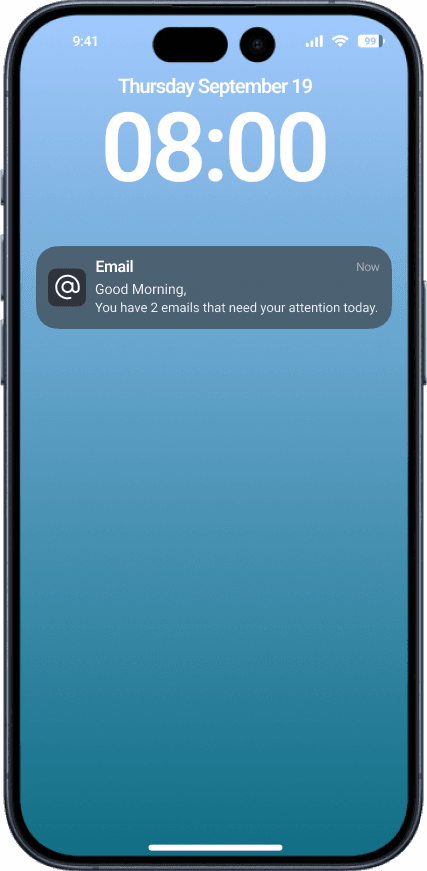
Morning lock screen notification: two emails need your attention today
Evening lock screen notifications: tasks completed and tasks due tomorrow

Reminders in the morning, a pat on the back at night

Reminders in the morning, a pat on the back at night

Notifications tell users what needs attention today and what is due tomorrow, and congratulate them when every task is done.

Notifications tell users what needs attention today and what is due tomorrow, and congratulate them when every task is done.

Organized by sender

Organized by sender

Tabs group emails by sender or platform, such as school, LinkedIn or FAFSA, so the inbox is easier to scan.

Tabs group emails by sender or platform, such as school, LinkedIn or FAFSA, so the inbox is easier to scan.

Inbox organized by sender tabs such as School, LinkedIn and FAFSA
Calendar view showing emails by due date

Due dates on a calendar

Due dates on a calendar

A calendar view shows which days have emails due, with the emails for the selected day listed below.

A calendar view shows which days have emails due, with the emails for the selected day listed below.

03 · RESEARCH

What students said

What students said

In interviews, students described the same pattern: an inbox flooded with different kinds of email, a starred list where everything ends up, and deadlines missed because the right email could not be found in time.

In interviews, students described the same pattern: an inbox flooded with different kinds of email, a starred list where everything ends up, and deadlines missed because the right email could not be found in time.

“

I get flooded with emails, from campus events, homework, internships, and work. It’s overwhelming keeping track of everything.

Too many kinds of email

“

I star every important or action-required email, but when everything’s starred, it’s hard to keep track of what actually needs attention.

The star does two jobs

“

All these emails stress me out. It feels like there’s too much to handle, and I don’t even know where to start.

Stress and overload

“

I’ve missed deadlines just because I couldn’t find the email in time or forgot to check back on the ones I starred.

Missed deadlines

[ADD: number of interviews and who the participants were]

[ADD: number of interviews and who the participants were]

04 · INSIGHTS

From pain points to design decisions

From pain points to design decisions

Three pain points came up again and again, and each one became a design decision.

Three pain points came up again and again, and each one became a design decision.

Pain point

Students star emails that are important or need action, so the starred page overflows.

↓

Design decision

Separate pages for important and action emails

Pain point

They feel guilty when they miss tasks or deadlines.

↓

Design decision

Deadline reminders, and a well-done when tasks are complete

Pain point

They feel stressed and overwhelmed by the influx of different kinds of email.

↓

Design decision

Emails organized by sender or platform

05 · REFLECTION

What I took away

What I took away

[ADD: what you learned and what you would do next]

[ADD: what you learned and what you would do next]